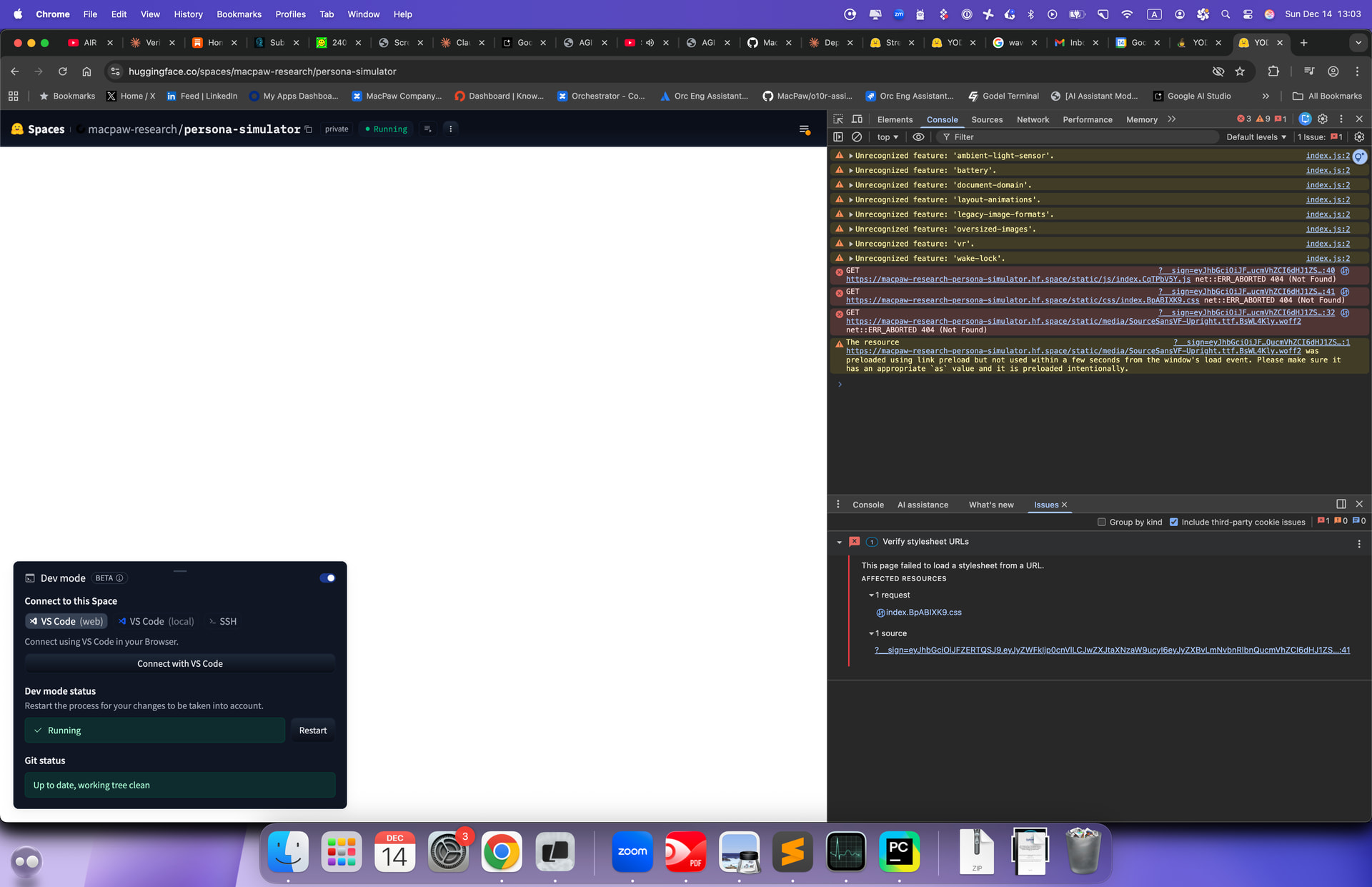
Having issue deploying streamlit app to huggigface space. Tried to nuke space and start fresh, tried starting from no template and with streamlit template - same issue. White screen on loading, browser errors on loading static resources, no errors in console. Any suggestions?
1 Like
There are several known potential causes.
Your screenshot is not “Streamlit crashed.” It is “the browser loaded an HTML shell that references hashed Streamlit assets, but those assets 404, so the page stays white.”
You can see it directly in the DevTools console:
GET .../static/js/index.<hash>.js→ 404GET .../static/css/index.<hash>.css→ 404GET .../static/media/SourceSans...woff2→ 404
If the JS bundle does not load, Streamlit cannot render anything. White screen is the expected result.
Causes ranked for your exact symptom
1) Stale cached index.html referencing old hashed assets (most common)
Streamlit’s frontend uses hashed filenames. After a rebuild the hash changes. If your browser (or an intermediate cache) still serves an older index.html, it will request old /static/...<oldhash>... files that no longer exist. That produces exactly what you see: a blank page plus 404s for the hashed assets.
This exact “updated Streamlit Space → blank/404 assets → logs look fine” pattern has been reported on HF, and clearing cache fixed it. (Hugging Face Forums)
Fix
- Open the direct Space URL on
*.hf.space(not just thehuggingface.co/spaces/...embed). - Chrome DevTools → Network → enable Disable cache → hard reload.
- Try Incognito.
- Clear site data for the
*.hf.spacedomain.
How to confirm
- If Incognito works but normal mode fails, it is caching. No code change needed.
2) Port mismatch (Docker Space): HF proxies 7860, Streamlit listens on 8501
If you are using Docker Spaces, HF defaults the exposed app port to 7860 unless you set app_port: in the README YAML. (Hugging Face)
Streamlit defaults to 8501. If HF is routing or health-checking the wrong port, you can get “Space running but web UI broken” behavior, especially when combined with partial caching.
HF maintainers regularly point to missing app_port: 8501 as the fix for Docker+Streamlit Spaces. (Hugging Face Forums)
Fix
-
If
sdk: docker, add toREADME.mdYAML:app_port: 8501(if Streamlit is on 8501) (Hugging Face)
-
Ensure Streamlit binds to all interfaces:
streamlit run app.py --server.address=0.0.0.0 --server.port=8501
How to confirm
- In the container,
curl -I http://127.0.0.1:8501/returns 200. - Public UI starts working after setting
app_port.
3) Streamlit SDK Space: you overrode the port away from 8501
If you are using HF’s Streamlit SDK Space (not Docker), HF states only port 8501 is allowed and warns not to override it in .streamlit/config.toml. (Hugging Face)
Fix
- Remove any
port = ...override in.streamlit/config.toml. - Do not try to run Streamlit on 7860 in Streamlit SDK mode.
4) Reverse-proxy base path or trailing-slash routing (common elsewhere, less likely on HF root)
Your symptom (blank page + 404 JS/CSS) is also what Streamlit looks like behind a proxy when the URL path is not what Streamlit expects. Examples:
- “Blank page, title Streamlit, 404 JS/CSS” after deployment behind ingress/proxy. (Streamlit)
- Streamlit behind reverse proxy can break if the trailing slash behavior is wrong. (GitHub)
- If serving under a prefix, you may need
server.baseUrlPath. (Streamlit)
On HF, most apps are served at / on *.hf.space, so this is usually not the first suspect. It becomes relevant if you added your own proxy layer inside Docker (nginx, FastAPI mount, etc.).
5) Docker user / permissions pitfalls (relevant if you customized the runtime user)
This does not usually create “404 for Streamlit’s own hashed assets,” but it often causes “it runs locally, behaves oddly on Spaces,” and it can break builds or runtime file writes.
Your note captures the key points:
- HF Docker Spaces want the runtime to be UID 1000, and
/appowned by that UID for Dev Mode stability. - Setting
ENV USER=blazordoes not create an OS user, soCOPY --chown=blazorcan fail if the user does not exist. - Safer pattern is numeric ownership:
COPY --chown=1000:1000 ...
If you did any user renaming, simplify to UID 1000 + numeric --chown until the UI is stable.
Debugging playbook that converges quickly
Step 0: Identify your Space type in README.md
Look at the YAML header:
sdk: streamlit→ Streamlit SDK rules apply, port 8501 only. (Hugging Face)sdk: docker→ Docker port rules apply, default port 7860 unlessapp_portis set. (Hugging Face)
This one step determines which fixes are even relevant.
Step 1: Prove or eliminate caching in 60 seconds
- Open
https://<space>.hf.space/directly (not just the Hub page embed). - Incognito.
- DevTools Network tab → Disable cache → reload.
If that fixes it, stop. It was stale cached HTML referencing old hashed assets. HF users have reported this exact fix. (Hugging Face Forums)
Extra confirmation:
-
Right-click → View page source.
-
Find the referenced
index.<hash>.js. -
Paste that exact URL into the address bar.
- If it 404s, the HTML is out of sync with the server.
Step 2: If Docker, validate the port end-to-end
HF Docker docs: default exposed port is 7860 and you can change it with app_port. (Hugging Face)
Inside Dev Mode terminal:
-
Check listening ports:
ss -lntp | egrep '(:7860|:8501)\b' -
Test locally:
curl -I http://127.0.0.1:8501/curl -I http://127.0.0.1:8501/static/(should not be “everything 404”)
Then ensure README YAML matches the port you confirmed:
- If Streamlit listens on 8501, set
app_port: 8501. (Hugging Face)
HF forum staff explicitly ask “are you missing app_port: 8501?” in Docker debugging threads. (Hugging Face Forums)
Step 3: If Streamlit SDK, remove port overrides
HF Streamlit SDK docs: only port 8501 allowed. Do not override in config.toml. (Hugging Face)
Check .streamlit/config.toml and remove:
[server] port = ...(unless it is 8501)
Streamlit’s own config.toml docs show where this file is picked up and how it is applied. (StreamlitDocument)
Step 4: Use Dev Mode properly (you already enabled it)
Dev Mode gives you SSH and VS Code into the running container and lets you restart the app quickly. (Hugging Face)
Use it to:
- inspect ports
- curl localhost endpoints
- compare what the container serves vs what the browser requests
Common “next problem” after the white screen: uploads fail with 403
Once your UI loads, file upload often fails on Spaces because cookies are restricted in the embedded context. HF documents disabling Streamlit XSRF protection as the workaround. (Hugging Face)
Not your current 404 symptom, but highly likely to come next if you use st.file_uploader().
Summary
- Your screenshot matches “hashed Streamlit static assets 404.” That usually means stale cached HTML. Clearing cache has fixed the same symptom on HF. (Hugging Face Forums)
- If you are on Docker, verify Streamlit port vs
app_port(7860 vs 8501). HF docs and staff examples point toapp_port: 8501as the common fix. (Hugging Face) - If you are on Streamlit SDK, do not override the port away from 8501. (Hugging Face)
- Use Dev Mode to
ssandcurllocalhost endpoints and prove what the container is serving. (Hugging Face) - If you changed Docker users, keep UID 1000 and use numeric
--chown=1000:1000until stable.
This usually isn’t a Streamlit bug — it’s a static asset path / base URL mismatch inside Hugging Face Spaces.
What’s happening under the hood:
• Hugging Face serves your app behind a reverse proxy
• Streamlit assumes / as the root path
• HF Spaces injects the app under a subpath
• Result: JS/CSS assets are requested from /static/… instead of the Space-relative path → 404s → white screen
That’s why:
• App “runs”
• No Python errors
• Browser shows missing static resources
Things that reliably fix this:
- Explicitly set Streamlit server options
Add a .streamlit/config.toml:
[server]
enableCORS = false
enableXsrfProtection = false
baseUrlPath = “”
2. Make sure Streamlit is started via HF’s expected entrypoint
Your app.py should be at repo root, and not wrapped in custom runners.
3. Check for hardcoded /static/ references
If you’re using custom HTML, JS, or st.markdown(unsafe_allow_html=True), make sure assets are referenced relatively, not /static/…
4. Avoid custom index.html
Streamlit Spaces should not include their own HTML shell. Let Streamlit generate it.
5. Clear cached build artifacts
Sometimes HF caches old static bundles. A full rebuild (rename Space or toggle hardware) often resolves phantom 404s.
⸻
Why this shows as a white screen
Streamlit loads, but its JS bundle fails to hydrate. HF doesn’t surface that as a backend error — it’s purely a frontend failure.
⸻
If you want to confirm quickly:
• Open DevTools → Network
• Filter *.js or *.css
• You’ll see 404s pointing to incorrect paths
Happy to look at the repo structure if you want to pinpoint which asset is breaking.
1 Like